TechTrackGroup MapLast updated: 05/08/2026
Dispatch a Technician
Step-by-step instructions for dispatching a technician to a service call from the TechTrack Device Group Map.
The Datablaze dispatch tool offers the ability to dispatch technicians to a service call. This tool can be found on the Device Group Map.
How to Dispatch a Technician:
1
Login to the Datablaze Portal at https://techtrack.datablaze.com
2
You should be taken directly to the Group Map, if not, Click the menu icon  at the top left of the screen. Then click “Group Map”.
at the top left of the screen. Then click “Group Map”.3
If you have multiple Device Groups, verify you have selected the group you would like to work with in the Device Group box  at the top right of the screen.
at the top right of the screen.4
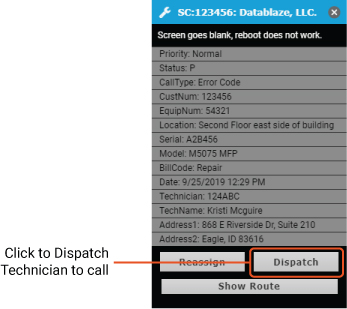
Next, click on the service call icon on the map that you would like to dispatch.
5
At the bottom of the window, click “Dispatch”.
6
A confirmation window will appear, to dispatch the technician to the call click “Confirm”.
Was this article helpful?
That’s Great!
Thank you for your feedback
Sorry! We couldn't be helpful
Thank you for your feedback
Feedback sent
We appreciate your effort and will try to fix the article