Creating, editing, and managing user accounts including access levels, automatic logout, and device group restrictions.
The User Access page provides the user with the ability to create, edit, and delete sub-user accounts.
Note: Creating a user sets up working login credentials, so this task requires Administrator access. Because you enter the password yourself, we recommend sharing it with the new user through a secure method rather than email or chat.
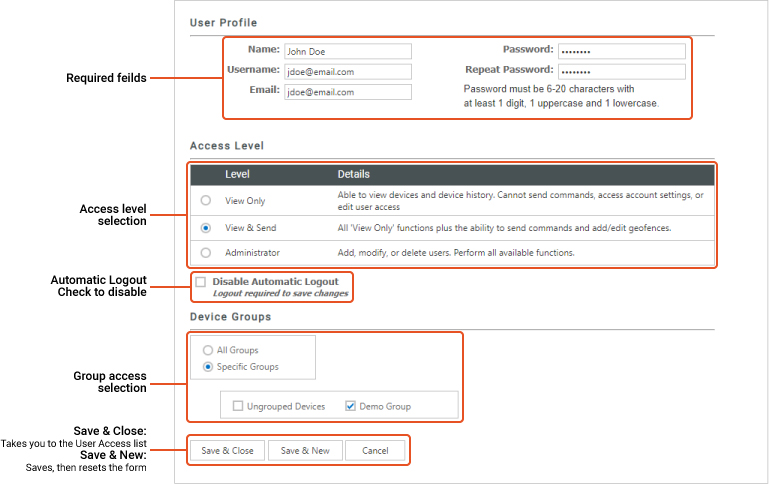
From the User Manager, click the Add User button above the user list. A blank user form opens, containing the sections described below.
The Access Level option allows the user to create permissions for the user based on three levels, shown below:
The option to disable automatic logouts will override the automatic logout feature. This feature is used to keep your information secure. If the Datablaze Web Portal notices you have not used the portal for 30 minutes, the system will automatically log you out. Checking the box next to "Disable Automatic Logout" will disable this feature. NOTE: Changes to Automatic Logout feature require the user to logout of the portal for the changes to take effect.
The Device Groups feature allows the user to select specific groups for this user to have access to. Options include "All Groups" or "Specific Groups". To select specific groups, click the radio button next to "Specific Groups" then check the box next to the group or groups you would like to allow this user to view.
When you have finished filling out the form, choose the option that matches what you need to do next:
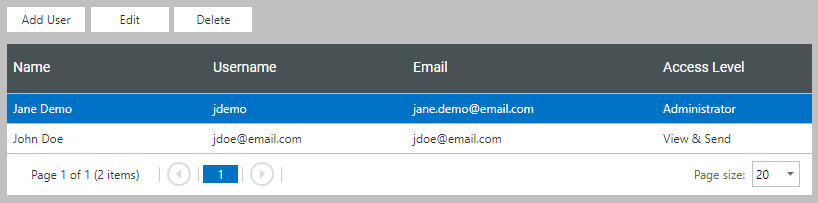
Once saved, the new user appears in the User Access list and can log in with the username and password you entered.
To edit a user, either double-click the username in the User Access list, or select the user in the list and click the "Edit" button.
Was this article helpful?
That’s Great!
Thank you for your feedback
Sorry! We couldn't be helpful
Thank you for your feedback
Feedback sent
We appreciate your effort and will try to fix the article